
Available now: On the Atlassian Marketplace
Turn your triage criteria into Jira actions.
Choose the Jira fields to read, describe your possible outcomes, and assign actions to each one. Jev classifies the issue; your configuration determines what happens next.
Built on Atlassian Forge for Jira Cloud. Billing and licensing run through the Atlassian Marketplace.
Read the demo description
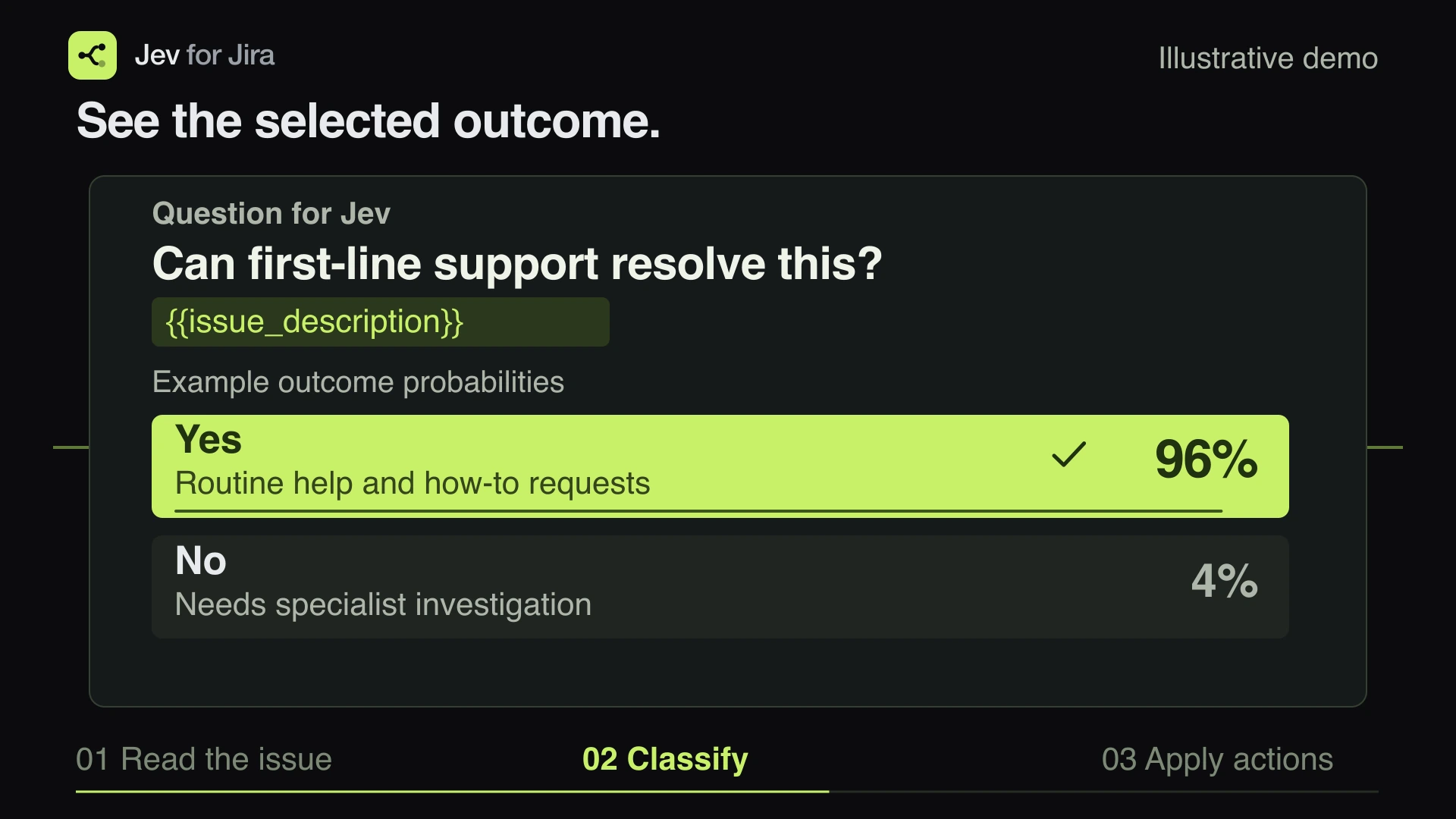
Synthetic issue SUP-128, “I cannot reset my password”, contains an expired reset-link request. The configured question uses the Jira description to ask whether first-line support can resolve it. The example assigns Yes 96% and No 4%. For Yes, the configured actions add first-line-support and set the title to “[Support] I cannot reset my password”. Jev selects the outcome; the administrator defines the actions. This animation makes no Jira or model requests.
No API key to supply
We cover the Jev processing costs. Your site does not need its own AI account or API key.
Your outcomes. Your actions.
Jev selects from your configured outcomes. The app validates the response and applies only the actions attached to those outcomes. Test previews a saved rule without editing the issue.
No second tool to log into
Manage project automations and review activity inside Jira. Configuration and logs are stored in Forge; AI classification uses OpenRouter and TypeSafe.
Make your triage criteria explicit.
Does this request fit first-line support? Does this bug need backend work? Which product area does it concern? Turn those decisions into named outcomes and configured Jira actions.
The inconsistency
Put classification criteria in a shared rule that project administrators can review and refine.
The queue
Run enabled rules when issues are created or relevant fields change, using the triggers you choose.
The criteria
Describe what an outcome means in plain language, with separate criteria for each possible choice.
The record
Review classifications, model scores and action results together in Activity log, without storing a full copy of the issue body.
Describe the decision. Assign the actions. Enable the rule.
Watch each step in Jira. These short, silent demos use a test project and synthetic issue data.
Choose a project you administer. Insert Description, Summary, Labels, Priority or supported custom-field variables into the prompt. The app shows which Jira values the classification will use.
Read the video description
The First-line support automation asks whether a request can be resolved using documented steps. The administrator opens Add Jira variables and inserts Summary and Description into the question. These variables supply the content of each issue when the rule runs.
Use Jira values in prompts and action templates.
Insert supported Jira variables from a picker. They work in prompts, outcome descriptions and text action values, including ticket titles. The app supplies the Jira bindings and rejects unknown or unavailable variables when you save.
{{issue_description}}{{issue_summary}}{{issue_labels}}{{issue_priority}}{{issue_key}}{{project_key}}{{customfield_12345}}
Five configurable action types
Action text comes from your templates. Custom field updates support text, numbers and Jira option selections. Field availability, value types and permissions are checked before execution.
Your site controls AI processing.
Explicit authorization
A site administrator must authorize external AI processing before classifications or tests can run. Withdrawing it blocks new requests and action batches; it cannot recall sent data, cancel an accepted move, or stop every edit in an already-started batch.
App edits, administrator permissions
Background reads use the administrator who last saved the rule. New edits use the app account. Before each edit, the app rechecks that administrator's issue access and permissions; Jira also enforces the app's access.
Know what leaves Jira
The prompt, outcome criteria and referenced Jira values are sent to OpenRouter and TypeSafe. Values used only in action templates are expanded locally. Activity access also requires permission to view the issue.
14 days of activity
Activity is hidden after 14 days and configured to expire in Forge storage. Execution receipts expire 14 days after the original run was created; updates do not extend retention. Physical cleanup can lag; provider-side retention follows separate policies.
Uncertain writes require review. The app uses event receipts and self-trigger guards to reduce duplicate execution. When a Jira write cannot be confirmed, it marks the run Needs review instead of automatically repeating that write.
AI processing takes place outside Atlassian. This app does not qualify for the Runs on Atlassian badge. It does not enforce provider zero retention, no training, or a fixed processing region.
See the classification and the action result.
The log shows the issue, rule, time, outcomes, model probabilities and action results or errors. It also records failed dry tests. The scores come from the model; they do not guarantee that a classification is correct.
What a run keeps
Issue identifiers, rule and outcome labels, model scores, action statuses and sanitized errors. Full issue bodies, expanded action values and provider credentials are excluded.
What a failure keeps
A valid classification is retained when an action fails. Planning errors, such as an overlong title, identify failed and skipped actions. Later Jira errors can leave a run partially applied.
Who can read it
Project administrators for their projects, and Jira site administrators. Entries are shown only when the viewer can access the referenced issue.
How long
Activity is visible for 14 days. Rules remain until deleted; the activity retention period does not apply to all configuration or external providers.
Built for project administrators.
Pricing
One plan. Jev processing included.
Your team defines the rules. We cover the model costs.
Launch pricing
$1per licensed Jira user
per month · USD
For Jira sites with more than 10 licensed users. Applies to every licensed Jira user, with no volume discounts.
Jev processing is included. No separate AI account or API key required.
Get it on MarketplaceAvailable on the Atlassian Marketplace.
Included with Jev for Jira
- Yes / No, single-choice and multiple-choice classification
- Configured labels, titles, descriptions and custom-field actions
- Jira variables in prompts and action templates
- Test runs with model scores and action previews
- 14 days of classification and action history
- Automatic retries for classifications waiting on service recovery
1-10 licensed Jira users? USD $10 per month for the whole site. Jev processing is included.
The questions admins ask first.
Is Jev for Jira available on the Marketplace?
Yes. Jev for Jira is available for Jira Cloud on the Atlassian Marketplace. Install it from the listing; trials, billing and licensing run through Atlassian. App Terms and the Privacy Policy are available on this website.
How much will Jev for Jira cost?
Launch pricing is USD $10 per month for Jira sites with 1-10 licensed users. Above 10 users, the price is USD $1 per licensed Jira user per month, applying to every licensed user with no volume discounts. Annual billing follows Marketplace user tiers, with each annual tier priced at 10 times its monthly tier price. We cover Jev processing costs, so you do not need a separate AI account or API key. You subscribe through the Atlassian Marketplace.
Which model does it use, and do I need an API key?
It uses TypeSafe's typesafe/jev-1.13 through OpenRouter. We pay for Jev usage and manage the backend credential. Customers do not need their own OpenRouter account or API key.
Can the model create new actions or write the replacement text?
The model selects configured outcomes; it does not author the action plan or replacement prose. Titles and field values come from your templates. A classification can still be wrong, so test representative issues before enabling actions.
Who can create automations?
Project administrators can manage rules for their projects. Jira site administrators can manage projects and authorize external AI processing. Activity entries also require access to the referenced issue.
What happens after installation?
A site administrator must authorize external processing before model requests are allowed. Saving an automation enables it for its configured triggers without backfilling existing issues. Test previews a saved rule without editing the issue; Disable stops future automatic runs.
Which Jira fields can I use?
Insert Description, Summary, Labels, Priority and supported custom-field variables into your prompt or outcome descriptions. These variables determine the classification input. Custom-field updates depend on Jira field context and allowed values.
Can I use variables in ticket titles?
Yes. The title action has a variable picker and supports templates such as [Support] {{issue_summary}}. The 255-character limit is checked after expansion. An invalid title stops the action plan and is recorded in Activity log.
What happens if the prompt or issue is too large?
Prompt templates allow 8,000 characters; outcome descriptions allow 2,000 each. Jev has a 32,000-token context. The app separately caps the expanded request at 30,000 UTF-8 bytes. Oversized input fails without Jira actions or truncation.
Who appears as the author in Jira history?
New edits use the app account. Reads and permission checks use the administrator who last saved the rule. The app also needs Jira access. Existing history and already-submitted older moves keep their original author.
Can it move issues between projects?
Supported moves use a configured destination and issue type, subject to Jira permissions and restrictions. Accepted moves are tracked asynchronously. Unsupported cases or failures are reported; acceptance is not reported as completion.
Does issue data stay inside Atlassian?
No. The prompt, outcome criteria and referenced Jira values are sent to OpenRouter and TypeSafe after site-admin consent. The app does not enforce provider zero retention, no training, or a fixed processing region.
What is stored, and for how long?
Activity and execution receipts expire 14 days after the run was created. Progress updates do not extend this period; physical cleanup in Forge can lag. Rules remain until deleted. Full issue bodies, expanded action values and credentials are excluded from activity.
Does it search for duplicates or generate answers?
No. The current app classifies the configured issue input. It does not search other Jira issues for duplicates, generate free-form replies, or independently choose additional tools and actions.
Is the app available in other languages?
The app interface and documentation are currently English only.
Available now on the Atlassian Marketplace.
Jev for Jira is live for Jira Cloud. Install it from its Atlassian Marketplace listing; Jev processing is included, so there is no separate AI account or API key to set up.
Trials, billing and licensing are handled by the Atlassian Marketplace. Read the App Terms and Privacy Policy.